

The Synoptic Designer workspace is built around the SVG artboard. The artboard is the white editable map surface. The surrounding viewport can be panned and zoomed without changing the exported map.
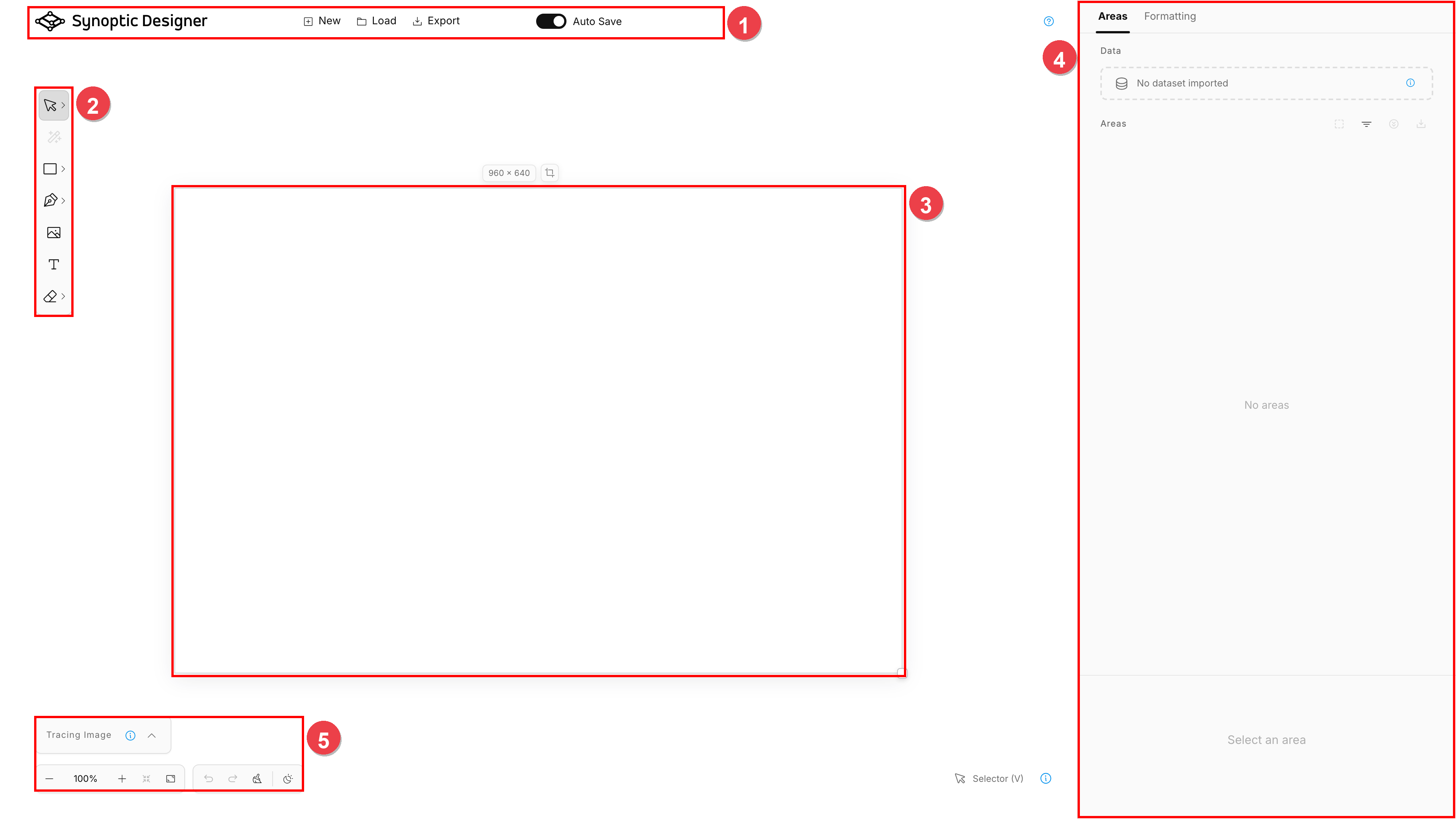
1. Header
The header contains project-level actions:
- New opens the project dialog on the New Project tab.
- Load opens the project dialog on the Load Project tab.
- Export opens the SVG export dialog.
- Auto Save controls browser-local saving.
- Save appears when Auto Save is disabled.
The resources menu opens documentation, release notes, support links, and Synoptic Panel references. The header also includes a Built for Synoptic Panel link.
Save status labels indicate whether the current project is saved locally, saving, unsaved, empty, or failed to save.
2. Toolbar
The left toolbar contains the editor tools. Some toolbar buttons open a grouped menu. You can click the main button to activate its current tool, or open the menu to choose another tool in the same group.
Creation tools can use Keep after Use. When enabled, the active creation tool remains active after creating an object. Press K to toggle this behavior when it is available. Synoptic Designer remembers the setting in the browser for later sessions.
Some tools show an options panel near the canvas while active. For example, Magic Wand shows tracing controls, and Grid shows grid generation controls.
3. Canvas
The central canvas contains the SVG document. Objects created on the canvas become part of the exported map unless they are editor-only helper content.
The artboard controls show the current artboard size. Artboard size changes affect the document coordinate space used by Synoptic Panel.
4. Right Inspector
The right inspector has two main tabs:
- Areas shows the SVG area hierarchy, data import, binding state, and selected-area metadata.
- Formatting shows appearance, geometry, alignment, distribution, and typography controls for the current selection.
The inspector follows the current canvas selection. Selecting an item in the Areas tree also selects the related canvas object.
5. Bottom Controls
The bottom-left controls include:
- Tracing Image panel;
- zoom controls and zoom presets;
- undo and redo;
- clear canvas.
Pan and zoom affect only the viewport. They do not create undo history entries and they do not alter exported SVG geometry.